Declaration
public static string TextArea(string text, params GUILayoutOption[] options);Declaration
public static string TextArea(string text, int maxLength, params GUILayoutOption[] options);Declaration
public static string TextArea(string text, GUIStyle style, params GUILayoutOption[] options);Declaration
public static string TextArea(string text, int maxLength, GUIStyle style, params GUILayoutOption[] options);Parameters
| text | Text to edit. The return value of this function should be assigned back to the string as shown in the example. |
| maxLength | The maximum length of the string. If left out, the user can type for ever and ever. |
| style | The style to use. If left out, the textField style from the current GUISkin is used. |
| options | An optional list of layout options that specify extra layouting properties. Any values passed in here will override settings defined by the style.<br>
Additional resources: GUILayout.Width, GUILayout.Height, GUILayout.MinWidth, GUILayout.MaxWidth, GUILayout.MinHeight,
GUILayout.MaxHeight, GUILayout.ExpandWidth, GUILayout.ExpandHeight. |
Returns
string The edited string.
Description
Make a multi-line text field where the user can edit a string.
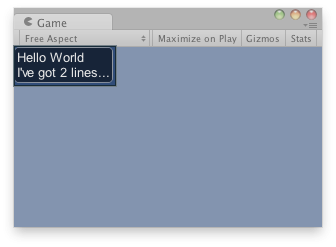
Text area in the Game View.
using UnityEngine;

public class ExampleScript : MonoBehaviour
{
    string stringToEdit = "Hello World\nI've got 2 lines...";

    void OnGUI()
    {
        // Make a multiline text area that modifies stringToEdit.
        stringToEdit = GUILayout.TextArea(stringToEdit, 200);
    }
}