Declaration
public static int Toolbar(int selected, string[] texts, params GUILayoutOption[] options);Declaration
public static int Toolbar(int selected, Texture[] images, params GUILayoutOption[] options);Declaration
public static int Toolbar(int selected, GUIContent[] contents, params GUILayoutOption[] options);Declaration
public static int Toolbar(int selected, string[] texts, GUIStyle style, params GUILayoutOption[] options);Declaration
public static int Toolbar(int selected, Texture[] images, GUIStyle style, params GUILayoutOption[] options);Declaration
public static int Toolbar(int selected, GUIContent[] contents, GUIStyle style, params GUILayoutOption[] options);Declaration
public static int Toolbar(int selected, string[] texts, GUIStyle style, GUI.ToolbarButtonSize buttonSize, params GUILayoutOption[] options);Declaration
public static int Toolbar(int selected, Texture[] images, GUIStyle style, GUI.ToolbarButtonSize buttonSize, params GUILayoutOption[] options);Declaration
public static int Toolbar(int selected, GUIContent[] contents, GUIStyle style, GUI.ToolbarButtonSize buttonSize, params GUILayoutOption[] options);Parameters
| selected | The index of the selected button. |
| texts | An array of strings to show on the buttons. |
| images | An array of textures on the buttons. |
| contents | An array of text, image and tooltips for the button. |
| style | The style to use. If left out, the button style from the current GUISkin is used. |
| options | An optional list of layout options that specify extra layouting properties. Any values passed in here will override settings defined by the style.Additional resources: GUILayout.Width, GUILayout.Height, GUILayout.MinWidth, GUILayout.MaxWidth, GUILayout.MinHeight, GUILayout.MaxHeight, GUILayout.ExpandWidth, GUILayout.ExpandHeight. |
| buttonSize | Determines how toolbar button size is calculated. |
Returns
int The index of the selected button.
Description
Make a toolbar.
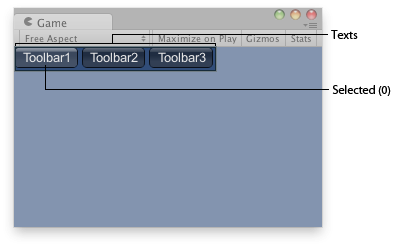
Toolbar in the Game View.
using UnityEngine;

public class ExampleScript : MonoBehaviour
{
    int toolbarInt = 0;
    string[] toolbarStrings = {"Toolbar1", "Toolbar2", "Toolbar3"};

    void OnGUI()
    {
        toolbarInt = GUILayout.Toolbar(toolbarInt, toolbarStrings);
    }
}