Declaration
public static float Slider(Rect position, float value, float leftValue, float rightValue);Declaration
public static float Slider(Rect position, string label, float value, float leftValue, float rightValue);Declaration
public static float Slider(Rect position, GUIContent label, float value, float leftValue, float rightValue);Parameters
| position | Rectangle on the screen to use for the slider. |
| label | Optional label in front of the slider. |
| value | The value the slider shows. This determines the position of the draggable thumb. |
| leftValue | The value at the left end of the slider. |
| rightValue | The value at the right end of the slider. |
Returns
float The value that has been set by the user.
Description
Makes a slider the user can drag to change a value between a min and a max.
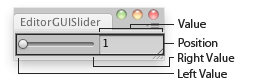
Slider in an Editor Window.
using UnityEngine;
using UnityEditor;

// Editor script that lets you scale the selected GameObject between 1 and 100

class EditorGUISlider : EditorWindow
{
    float scale = 1.0f;

    [MenuItem("Examples/EditorGUI Slider usage")]
    static void Init()
    {
        var window = GetWindow<EditorGUISlider>();
        window.position = new Rect(0, 0, 150, 30);
        window.Show();
    }

    void OnGUI()
    {
        scale = EditorGUI.Slider(new Rect(5, 5, 150, 20), scale, 1, 100);
    }

    void OnInspectorUpdate()
    {
        if (Selection.activeTransform)
        {
            Selection.activeTransform.localScale = new Vector3(scale, scale, scale);
        }
    }
}
Declaration
public static void Slider(Rect position, SerializedProperty property, float leftValue, float rightValue);Declaration
public static void Slider(Rect position, SerializedProperty property, float leftValue, float rightValue, string label);Declaration
public static void Slider(Rect position, SerializedProperty property, float leftValue, float rightValue, GUIContent label);Parameters
| position | Rectangle on the screen to use for the slider. |
| label | Optional label in front of the slider. |
| property | The value the slider shows. This determines the position of the draggable thumb. |
| leftValue | The value at the left end of the slider. |
| rightValue | The value at the right end of the slider. |
Description
Makes a slider the user can drag to change a value between a min and a max.